S3 and Lambda
Today, a small use case:
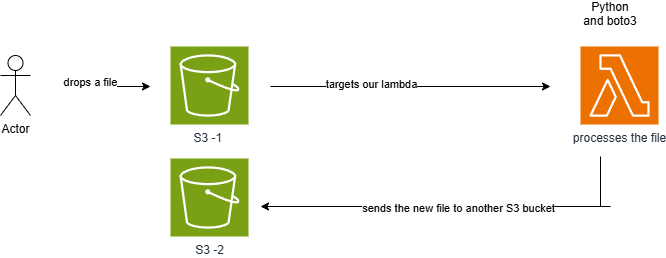
A user uploads a file to an S3 bucket, triggering an event that launches a Python Lambda function. This Lambda function makes some minor modifications to the file, creates a new version, and stores it in another bucket. The entire setup was implemented using Terraform.
Python file
import logging
import boto3

# Configure logging
logging.basicConfig(level=logging.INFO)
logger = logging.getLogger()

# Output bucket name
OUTPUT_BUCKET = "your-output-bucket"

def lambda_handler(event, context):
s3 = boto3.client('s3')

logger.info("Starting S3 event processing")

# Extract file information from the event
bucket = event['Records'][0]['s3']['bucket']['name']
key = event['Records'][0]['s3']['object']['key']

try:
logger.info(f"Downloading file: {key} from {bucket}")
response = s3.get_object(Bucket=bucket, Key=key)
content = response['Body'].read().decode('utf-8')

# Remove the letter 'a'
modified_content = content.replace('a', '')

# Define the new file name
new_key = f"modified_{key}"

# Upload the modified file to S3 output bucket
s3.put_object(Bucket=OUTPUT_BUCKET, Key=new_key, Body=modified_content)

logger.info(f"✅ Modified file stored in {OUTPUT_BUCKET} as {new_key}")

except Exception as e:
logger.error(f"❌ Error processing file {key}: {str(e)}")
raise e

return {"message": f"File {key} processed successfully and stored in {OUTPUT_BUCKET}"}
Terraform file config:
# S3 bucket to store the Lambda function code
resource "aws_s3_bucket" "lambda_code_bucket" {
bucket = "your-lambda-code-bucket"
}

data "archive_file" "lambda_zip" {
type = "zip"
source_file = "${path.module}/lambda_function.py"
output_path = "${path.module}/lambda_function.zip"
}

resource "aws_s3_object" "lambda_zip_object" {
bucket = aws_s3_bucket.lambda_code_bucket.bucket
key = "lambda_function.zip"
source = data.archive_file.lambda_zip.output_path
}

# IAM role for Lambda execution
resource "aws_iam_role" "lambda_exec_role" {
name = "lambda_exec_role"

assume_role_policy = jsonencode({
Version = "2012-10-17",
Statement = [
{
Action = "sts:AssumeRole",
Effect = "Allow",
Principal = {
Service = "lambda.amazonaws.com",
},
},
],
})
}

# S3 bucket for output data
resource "aws_s3_bucket" "output_bucket" {
bucket = "your-output-bucket"
}

# IAM policy allowing Lambda to access S3 and CloudWatch
resource "aws_iam_policy" "lambda_policy" {
name = "lambda_policy"
description = "Policy allowing Lambda to access S3 and CloudWatch"

policy = jsonencode({
Version = "2012-10-17",
Statement = [
{
Effect = "Allow",
Action = [
"s3:GetObject",
"s3:PutObject"
],
Resource = [
"${aws_s3_bucket.lambda_code_bucket.arn}/*",
"${aws_s3_bucket.input_bucket.arn}/*",
"${aws_s3_bucket.output_bucket.arn}/*" # Include the output bucket
],
},
{
Effect = "Allow",
Action = [
"logs:CreateLogGroup",
"logs:CreateLogStream",
"logs:PutLogEvents"
],
Resource = "*",
}
],
})
}

resource "aws_iam_role_policy_attachment" "lambda_policy_attachment" {
role = aws_iam_role.lambda_exec_role.name
policy_arn = aws_iam_policy.lambda_policy.arn
}

# AWS Lambda function to process S3 events
resource "aws_lambda_function" "s3_event_processor" {
function_name = "s3_event_processor"
s3_bucket = aws_s3_bucket.lambda_code_bucket.bucket
s3_key = aws_s3_object.lambda_zip_object.key
handler = "lambda_function.lambda_handler"
runtime = "python3.8"
role = aws_iam_role.lambda_exec_role.arn
}

# S3 bucket for input data
resource "aws_s3_bucket" "input_bucket" {
bucket = "your-input-bucket"
}

# Configure S3 to trigger Lambda on object creation
resource "aws_s3_bucket_notification" "bucket_notification" {
bucket = aws_s3_bucket.input_bucket.id

lambda_function {
lambda_function_arn = aws_lambda_function.s3_event_processor.arn
events = ["s3:ObjectCreated:*"]
}
}

# Allow S3 to invoke the Lambda function
resource "aws_lambda_permission" "allow_s3_invoke" {
statement_id = "AllowS3Invoke"
action = "lambda:InvokeFunction"
function_name = aws_lambda_function.s3_event_processor.function_name
principal = "s3.amazonaws.com"
source_arn = aws_s3_bucket.input_bucket.arn
}